 Panic Button
Close all tabs.
Restore in a click.
Close all your tabs with one click or one shortcut, and bring them back whenever you need them. Nothing is lost, pinned tabs included.
Free. No account, no sign-up, no ads. Support the developer for $1
A clean browser, right now.
Some moments leave no time to close tabs one by one. Panic Button closes them all in a single click and takes you to a safe page of your choice.
Someone walks up behind you
One click or one shortcut and every tab is gone before they read the screen.
A screen share starts unexpectedly
Hit the shortcut without touching the mouse and share a clean browser.
You just need a fresh start
Clear the clutter of dozens of tabs, then restore your whole session when the moment has passed.
Everything Panic Button does.
A small, fast extension that does one job well. All of it is free.
One-click panic
Close all tabs instantly from the toolbar button.
Keyboard shortcut
Trigger it without touching the mouse. Default Ctrl+Shift+Y (Cmd+Shift+Y on Mac), changeable to any combination in settings.
Restore tabs
Reopen your last closed session with one button, pinned tabs included.
Safe page
Choose the page that opens after your tabs close: a search engine, a work site or a blank page.
Clear today's history
Optional. Remove today's browsing history when you panic. Off by default.
Lightweight
No account, no sign-up, no ads.
Good to know. If you turn on Clear today's history, Chrome cannot recover that history, so use it only when you want that. Tabs saved for restore stay on your computer.
Four steps to a clean browser.
Pin it to your toolbar
Pin Panic Button so the icon is always one click away.
Choose your settings
Right-click the icon to open settings and pick your safe page and shortcut.
Close all tabs
Click the button or press your shortcut. Every tab closes instantly.
Restore tabs
Click Restore tabs when you want your session back.
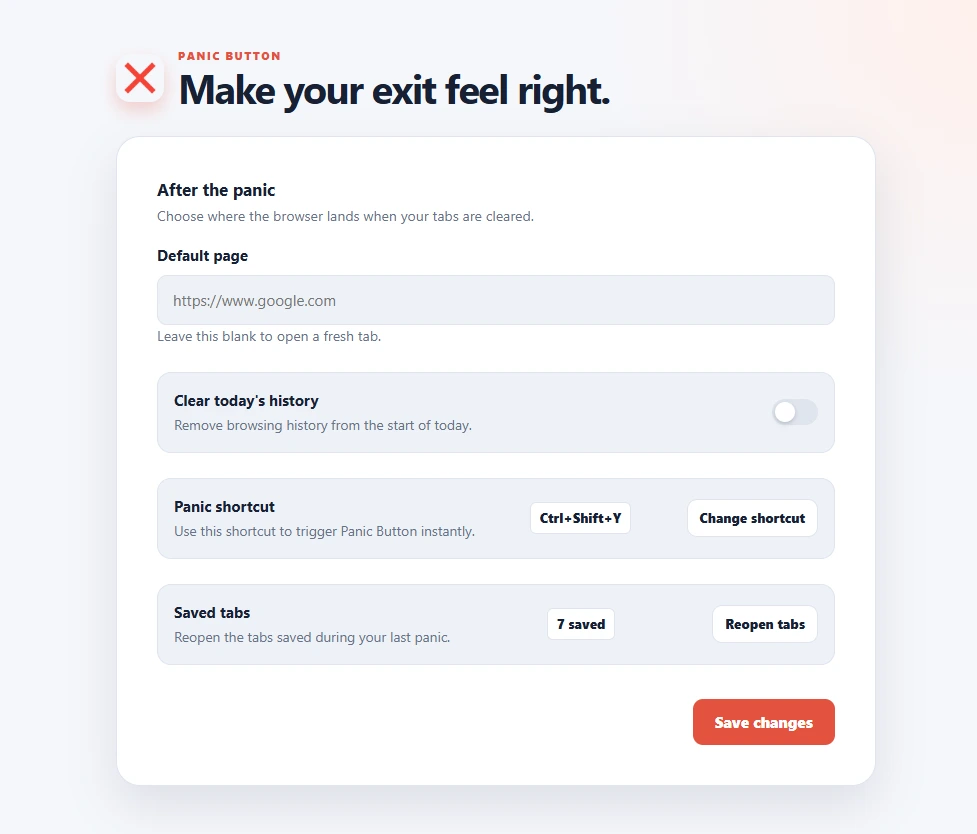
Make your exit feel right.
Right-click the Panic Button icon to open settings. Four options decide what happens when you panic.
- Default page
- The safe page that opens after your tabs close. Use a search engine, a work site or a blank page.
- Clear today's history
- Optional and off by default. Removes today's browsing history when you panic.
- Panic shortcut
- Ctrl+Shift+Y by default (Cmd+Shift+Y on Mac). Change it to any combination you like.
- Saved tabs
- Shows how many tabs were saved at your last panic and restores them in one click.
Install it free. Support it for $1.
Install the extension
Available on both stores. Chromium browsers such as Edge and Brave can use the Chrome Web Store version.
Support the developer
- One-time payment of $1, no subscription
- Secure checkout by Dodo Payments
- License and receipt arrive by email
- Helps keep Panic Button maintained